

Understanding SordinHEAR2 and its audio profiles
Electronic features & Sound profiles (HEAR2)
(Available on Supreme Pro-X, Pro-X LED, T2)
What is SordinHEAR2?
SordinHEAR2 is our advanced digital audio system that improves ambient sound quality, awareness, and comfort while maintaining full hearing protection.
Which models include SordinHEAR2?
Supreme Pro-X, Supreme Pro-X Slim, Supreme Pro-X SFA, Pro-X LED, T2 and T2 CC — come with SordinHEAR2 as standard.
Do all models have the same audio profiles?
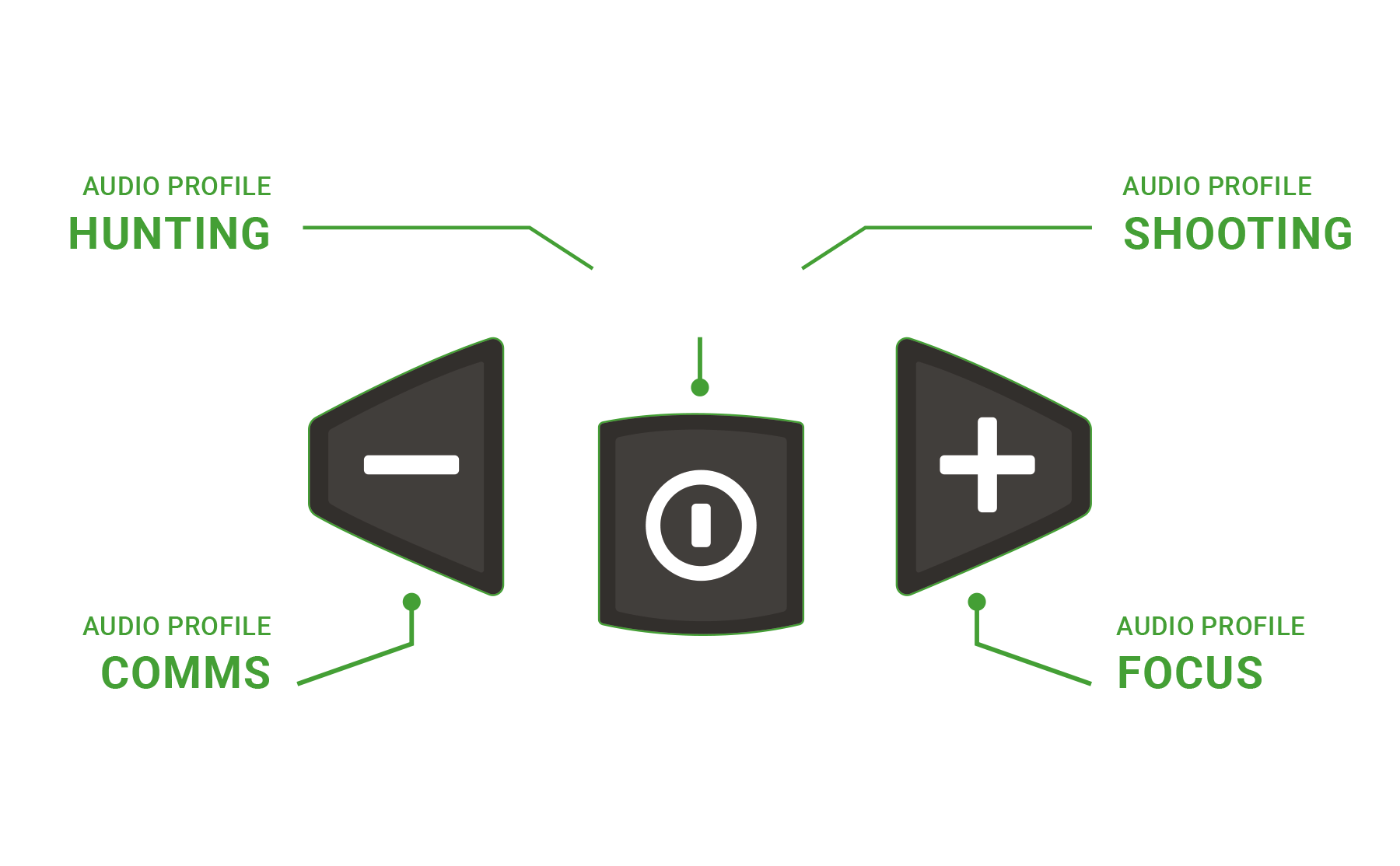
No. Pro-X and Pro-X LED use the profiles Hunter, Focus, Shooter, and Ambient Off.
T2 and T2CC uses Tactical, Comfort, Dual, and Ambient Off.
What are the audio profiles used for?
They let you adapt your sound experience to your environment — for example, sharper awareness when hunting or softer sound for range training.
Can I turn off ambient sound completely?
Yes. Select Ambient Off for full passive protection while AUX communication remains active.
Does SordinHEAR2 affect hearing protection?
No. The protection level is always the same; only ambient amplification changes.
How do I switch between audio profiles?
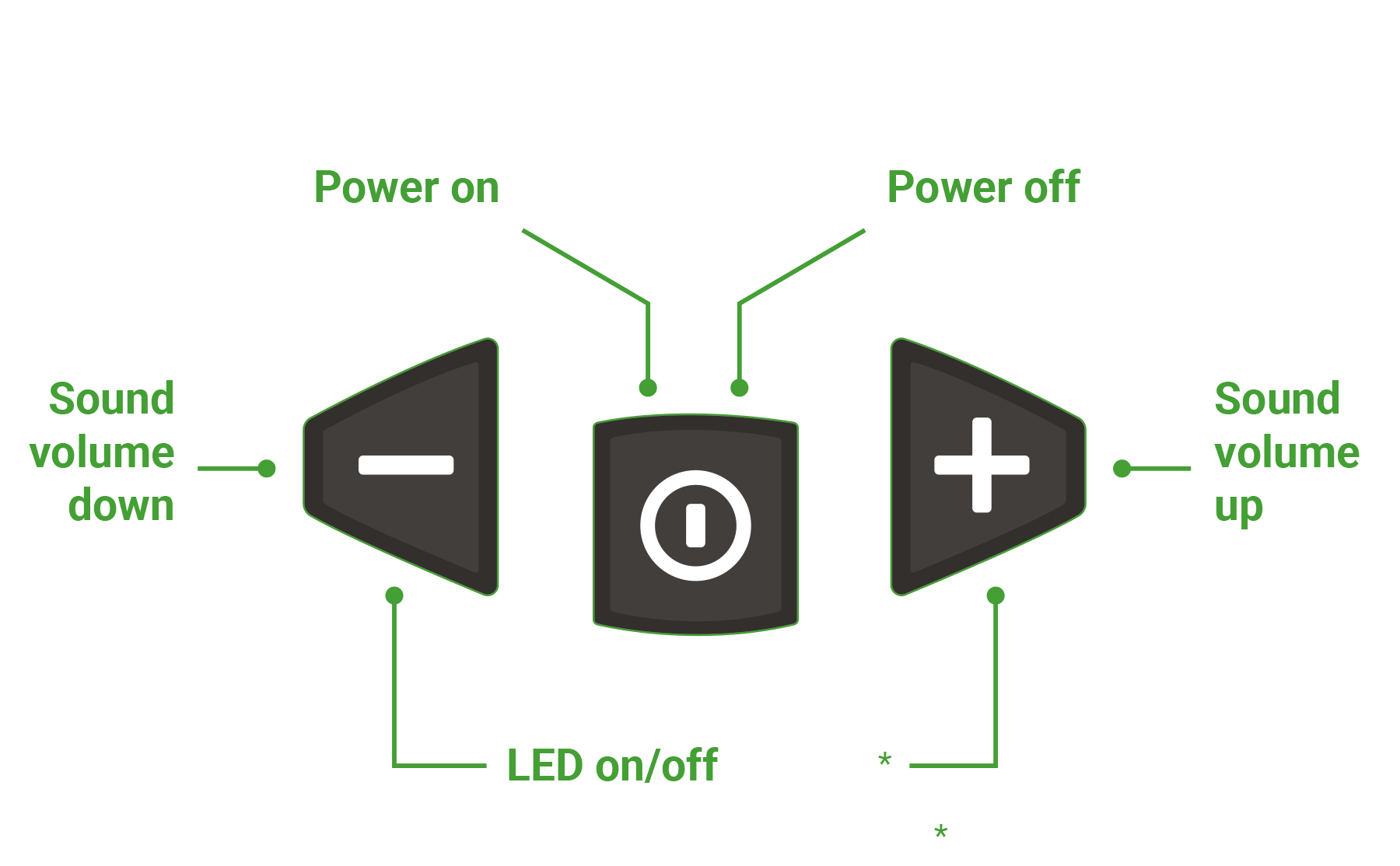
Use the control buttons as described in your Quick Guide. A short tone or voice feedback confirms each change, depending on your model.
Do I need to change profiles often?
No. Most users find one or two favorite profiles that fit their typical use.
Why does it sound different between profiles?
Each profile adjusts sensitivity and frequency range to suit specific situations — from quiet tracking to shooting at the range.
I hear a faint hiss in some profiles. Is that normal?
Yes. A slight hiss can occur in high-amplification modes like Focus or Dual. Lowering the volume usually removes it.
Microphones, radios, and communication compatibility
Bluetooth & Connectivity
Does my T2 work with all PTTs and radios?
No. The radio connector must match your setup. Please specify the correct configuration when ordering.
How do I install the T2 FlexCom CC?
Follow the instructions in the manual included in the box or available on our website.
Can I replace the microphone on T2 CC?
No, it’s not user-replaceable.
How do I install the T2 FlexCom CC?
Follow the instructions in the manual included in the box or available on our website.
Batteries, charging, and automatic power control
Power & Battery Management
How to change battery in Supreme pro family - How to video
Which batteries should I use for T2?
We include AA batteries with your product.
It’s also compatible with AA alkaline batteries (shorter runtime) and Sordin rechargeable batteries.
What is the battery life for T2?
- Sordin Power 14500 rechargeable battery: around 100 hours
- AA alkaline batteries: approximately 70 hours
Which direction should the battery be inserted?
Insert the battery with the positive pole (+) facing downwards.
A symbol on the battery cap shows the correct orientation.
How do I insert the batteries?
Insert with the+ (plus) side facing down.
A symbol on the battery lid shows the correct direction.
Will I get a low-battery warning?
Yes, when an approximate percentage of the battery capacity remains. At around 40 hours of remaining battery life for the Supreme Pro family, and at 10% for the T2 and T2CC.
A warning is also repeated about every 30 minutes until the battery is depleted for the T2 series.
Does the headset turn off automatically?
Yes. If no buttons are pressed for 4 hours, the unit will automatically power off.
A warning tone is heard before “auto power off,” giving you 15 seconds to press any button and keep it on.
How to wear, mount, and adapt your headset
Comfort, Fit & Compatibility
Can I use the headset with a helmet or other protective gear?
Yes. Choose helmet mounts (Arc-Rail or Team Wendy) or the Neckband versionfor use under helmets or other gear.
Switching setups is easy – no tools required – takes about a minute.
Do T2 headsets fit my helmet?
They fit all helmets with Arc or Team Wendy mounts.
Certification applies only to specific Team Wendy and Ops Core helmets.
Which suspension options are available?
Headband, Neckband, and Helmet (Arc or R-Arc).
You can switch between them quickly – no tools needed.
How do I change the suspension or headband?
Follow the manual or our online instructions.
Twist until the pin on the cup aligns with the slot in the suspension – no tools required.
Can I change the leather on my headband?
No. The leather isn’t replaceable; you’ll need a new headband.
Textile versions can be replaced.
Is there an automatic power-off function to save battery?
Yes. If no button is pressed within 4 hours, the unit automatically powers off.
A warning will sound 15 seconds before shutdown, giving you time to press any button to continue using it.
At what point does the unit shut down due to low voltage?
The unit automatically shuts down once voltage drops below a set threshold.
This prevents low voltage from affecting performance or sound quality.
Keeping your headset clean and in good condition
Maintenance & Hygiene
Where can I find user instructions or manuals?
A printed Manual and Quick Guide are included in the box.
You can also download detailed manuals with additional information from our website.
How do I clean my hearing protector?
Wipe with damp cloth and mild soap. Avoid strong solvents or submerging in water.
Can I wash the cushions?
Wipe cushions clean but don't soak them. Replace if they become damaged or won't clean properly.
How often should I clean them?
Weekly for regular use, or after exposure to excessive sweat, dirt, or chemicals.
What cleaning products should I avoid?
Avoid alcohol, solvents, or harsh chemicals that can degrade cushion materials.
Do I need to replace cushions/sealing rings?
For best hygiene and function, replace cushions and foam inserts every 6 months with regular use.
What's included in a hygiene kit?
Two cushions (sealing rings) and two foam inserts, plus installation instructions.
How do I know when to replace cushions?
Replace when you see cracks, permanent compression, stiffness, or poor seal.
How do I replace the inserts and sealing rings?
Replacement inserts and sealing rings are available as hygiene kits. If you use your hearing protector daily, we recommend that these parts be replaced at least twice a year.
Easy replacement as shown below.
Note: The illustration shows a Sordin Supreme model, however the principle is the same for all Sordin product families.
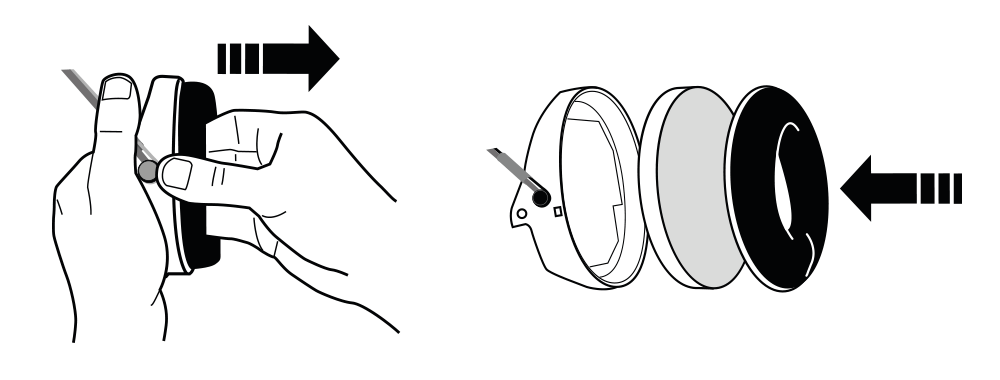
The foam inside is compressed
Replace the hygiene kit. Compressed foam reduces comfort and can affect sound quality in electronic models.
How should I store my hearing protection?
Store in a cool, dry place away from direct sunlight. Use the included bag if provided.
Should I do anything special for long-term storage?
Remove batteries from electronic models, clean thoroughly, and store in a dry environment.
Can extreme temperatures damage them?
Avoid storage in extreme heat or cold. Bring to room temperature before use if stored in cold conditions.
Quick fixes for the most common problems
Troubleshooting & Common Issues
The device won’t turn on?
Check battery direction (+/–), replace batteries, and hold the power button for 2 seconds.
No sound from one or both sides?
Ensure power is on, volume is up, and battery compartment is properly closed.
Sound keeps cutting out?
Replace with fresh AA batteries — this usually indicates low power.
I can’t hear ambient sound?
Make sure the microphones aren’t blocked and that volume is not at minimum.
Whistling sound or feedback?
Lower volume or switch to another audio profile (Focus/Dual).
Device turns off by itself?
Auto power-off activates after 4 hours of inactivity — press any button to stay active.
Static or crackling sounds
Check for moisture or loose batteries; dry and reseat.
Certification, warranty, and product information
Regulations & General Info
What are SNR and NRR values, and what is the difference between them?
Both are measures of how well a hearing protector reduces sound. In the US, NRR (Noise Reduction Rating) is used for ANSI certification. In Europe, SNR (Single Number Rating) is used for CE certification. There is no exact conversion rate, but SNR values are typically about 3–5 dB higher.
Where do I find the serial number on my product?
You find the serial number under the inserts.
Note: The illustration shows a Sordin Supreme model, however the principle is the same for all Sordin product families.

Can I use the headset together with earplugs?
Yes. X2 and T2 are tested and certified with Sordin Softear foam plugs.
For best performance, use the Dual sound profile.
How to control Sordin Supreme Pro-X (models from 2023-)
What is the warranty period for T2?
1 year.
Where can I find Quick Guides?
Inside the box and on our website under Support → Manuals & Guides.
What does the warranty cover?
The 2-year warranty covers manufacturing defects but does not cover normal wear and tear, batteries, or damage caused by misuse.